> ## Documentation Index
> Fetch the complete documentation index at: https://docs.getunblocked.com/llms.txt
> Use this file to discover all available pages before exploring further.
# Data Shield
> Get answers that respect third-party data source permissions
Data Shield tightly integrates with all the systems your team has connected to Unblocked,
ensuring that the responses you receive adhere to the permissions configured in those systems.
When activated, it restricts data access in Unblocked according to the permissions established in your connected third-party systems.
This guarantees that the answers generated by Unblocked only contain source material that the user posing the question is authorized to access.
## Demo video
Watch this brief video to see how enabling Data Shield affects your Unblocked responses.
In the video a sensitive document is added to Google Drive, and a user asks Unblocked about the information in the document.
With Data Shield disabled, Unblocked returns the document in the answer.
When Data Shield is enabled, Unblocked does not return the document in the answer.
## Setting up Data Shield
Open the Unblocked web app, go to **Settings**, and select **Data Shield** from the sidebar.
### Reviewing your data sources
The Data Shield page lists every data source your team has connected. Each row shows the source type, installation name, and a per-source **Status** toggle. Rows that need additional setup are highlighted and sorted to the top.
Use the **Provider** filter or **Find a data source** search to narrow the list.
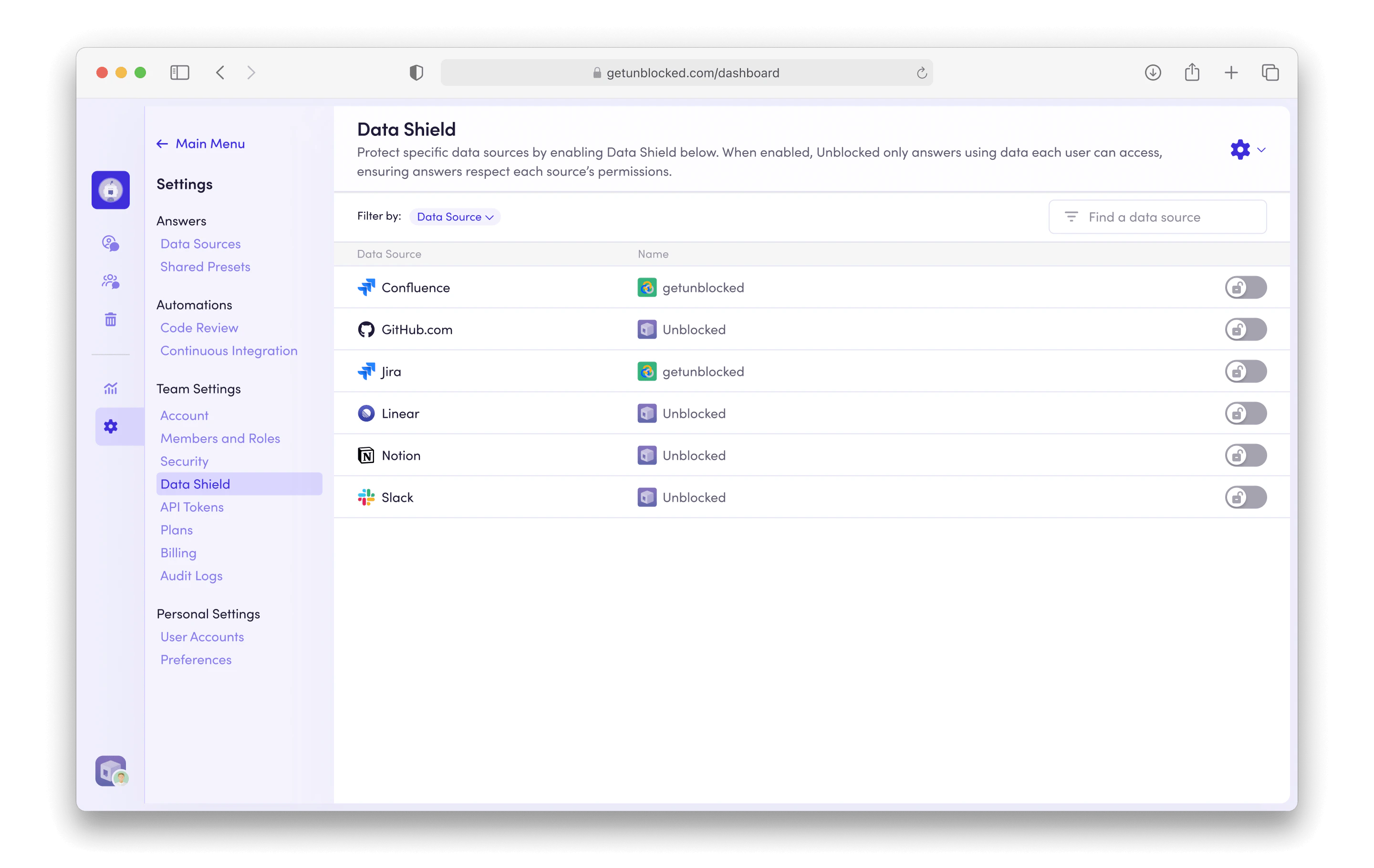 Data Shield is off by default for every data source — including newly
connected ones. Enable each source individually from this page.
### Additional admin setup
A few data sources require additional setup for Unblocked to accurately map user identities and permissions.
| Data Source | Required Role | Required Action |
| :--------------------------- | :------------------------------------------------------------------------------ | :-------------------------------------------------------------------------------------------------------- |
| GitHub and GitHub Enterprise | GitHub organization owner with access to coordinate DNS changes. | Follow [GitHub Domain Verification](/data-sources/github-domain-verification) setup. |
| Confluence | Confluence admin, typically a member of a user group named `confluence-admins`. | Connect [Confluence](/data-sources/confluence) to Unblocked with the admin account. |
| Confluence Data Center | Confluence site admin. | Connect Confluence Data Center to Unblocked with an admin token. |
| Google Drive | Google Workspace Super Admin. | Connect [Google Drive for Workspaces](/data-sources/google-drive-for-workspaces) instead of Google Drive. |
| Jira | Jira admin, typically a member of a user group named `jira-admins`. | Connect [Jira](/data-sources/jira) to Unblocked with the admin account. |
| Jira Data Center | Jira site admin. | Connect Jira Data Center to Unblocked with an admin token. |
## Recommended User Settings
After enabling Data Shield, encourage your team to [connect their accounts](/user-settings/connecting-accounts) for each integrated tool or system that does not have admin-level identity syncing configured. This lets Unblocked provide personalized answers based on the data each person has access to.
If Unblocked cannot automatically match a user's identity for a protected data source, any question they ask will first request that they connect the relevant account.
## Supported Data Sources
Data Shield supports the following data sources.
When Data Shield is enabled, users can only view data from these sources in their Unblocked answers,
provided they have access to the data within the third-party system.
| Data Source | Available Data Types |
| :----------------------------------------------------------------------- | :--------------------------------------- |
| [Asana](/data-sources/asana) | Projects, tasks |
| [Azure DevOps](/data-sources/azure-devops) | Code, pull requests |
| [Bitbucket Data Center](/data-sources/bitbucket-data-center) | Code, pull requests |
| [Bitbucket](/data-sources/bitbucket) | Code, pull requests |
| [Coda Enterprise](/data-sources/coda) | Documents |
| [Confluence Data Center](/data-sources/confluence-data-center) | Pages, blog posts |
| [Confluence](/data-sources/confluence) | Pages |
| [GitHub Enterprise](/data-sources/github-enterprise) | Code, discussions, issues, pull requests |
| [GitHub](/data-sources/github) | Code, discussions, issues, pull requests |
| [GitLab Self-Managed](/data-sources/gitlab-self-managed) | Code, pull requests |
| [GitLab](/data-sources/gitlab) | Code, pull requests |
| [Google Drive for Workspaces](/data-sources/google-drive-for-workspaces) | Documents |
| [Google Drive](/data-sources/google-drive) | Documents |
| [Jira Data Center](/data-sources/jira-data-center) | Issues |
| [Jira](/data-sources/jira) | Issues |
| [Linear](/data-sources/linear) | Issues |
| [Microsoft Teams](/data-sources/microsoft-teams) | Public, private channels |
| [Notion](/data-sources/notion) | Pages |
| [Slack](/data-sources/slack) | Public, private channels |
The following data sources are not supported by Data Shield.
Every member of your team will see data from these sources in their Unblocked answers.
| Data Source | Available Data Types |
| :--------------------------------------------------- | :---------------------------------------- |
| [Datadog](/data-sources/datadog) | Incidents, logs, metrics, monitors, hosts |
| [External Websites](/data-sources/external-websites) | Web pages |
| [Sentry](/data-sources/sentry) | Issues, errors, events |
| [Stack Overflow](/data-sources/stack-overflow) | Articles, questions |
Data Shield is off by default for every data source — including newly
connected ones. Enable each source individually from this page.
### Additional admin setup
A few data sources require additional setup for Unblocked to accurately map user identities and permissions.
| Data Source | Required Role | Required Action |
| :--------------------------- | :------------------------------------------------------------------------------ | :-------------------------------------------------------------------------------------------------------- |
| GitHub and GitHub Enterprise | GitHub organization owner with access to coordinate DNS changes. | Follow [GitHub Domain Verification](/data-sources/github-domain-verification) setup. |
| Confluence | Confluence admin, typically a member of a user group named `confluence-admins`. | Connect [Confluence](/data-sources/confluence) to Unblocked with the admin account. |
| Confluence Data Center | Confluence site admin. | Connect Confluence Data Center to Unblocked with an admin token. |
| Google Drive | Google Workspace Super Admin. | Connect [Google Drive for Workspaces](/data-sources/google-drive-for-workspaces) instead of Google Drive. |
| Jira | Jira admin, typically a member of a user group named `jira-admins`. | Connect [Jira](/data-sources/jira) to Unblocked with the admin account. |
| Jira Data Center | Jira site admin. | Connect Jira Data Center to Unblocked with an admin token. |
## Recommended User Settings
After enabling Data Shield, encourage your team to [connect their accounts](/user-settings/connecting-accounts) for each integrated tool or system that does not have admin-level identity syncing configured. This lets Unblocked provide personalized answers based on the data each person has access to.
If Unblocked cannot automatically match a user's identity for a protected data source, any question they ask will first request that they connect the relevant account.
## Supported Data Sources
Data Shield supports the following data sources.
When Data Shield is enabled, users can only view data from these sources in their Unblocked answers,
provided they have access to the data within the third-party system.
| Data Source | Available Data Types |
| :----------------------------------------------------------------------- | :--------------------------------------- |
| [Asana](/data-sources/asana) | Projects, tasks |
| [Azure DevOps](/data-sources/azure-devops) | Code, pull requests |
| [Bitbucket Data Center](/data-sources/bitbucket-data-center) | Code, pull requests |
| [Bitbucket](/data-sources/bitbucket) | Code, pull requests |
| [Coda Enterprise](/data-sources/coda) | Documents |
| [Confluence Data Center](/data-sources/confluence-data-center) | Pages, blog posts |
| [Confluence](/data-sources/confluence) | Pages |
| [GitHub Enterprise](/data-sources/github-enterprise) | Code, discussions, issues, pull requests |
| [GitHub](/data-sources/github) | Code, discussions, issues, pull requests |
| [GitLab Self-Managed](/data-sources/gitlab-self-managed) | Code, pull requests |
| [GitLab](/data-sources/gitlab) | Code, pull requests |
| [Google Drive for Workspaces](/data-sources/google-drive-for-workspaces) | Documents |
| [Google Drive](/data-sources/google-drive) | Documents |
| [Jira Data Center](/data-sources/jira-data-center) | Issues |
| [Jira](/data-sources/jira) | Issues |
| [Linear](/data-sources/linear) | Issues |
| [Microsoft Teams](/data-sources/microsoft-teams) | Public, private channels |
| [Notion](/data-sources/notion) | Pages |
| [Slack](/data-sources/slack) | Public, private channels |
The following data sources are not supported by Data Shield.
Every member of your team will see data from these sources in their Unblocked answers.
| Data Source | Available Data Types |
| :--------------------------------------------------- | :---------------------------------------- |
| [Datadog](/data-sources/datadog) | Incidents, logs, metrics, monitors, hosts |
| [External Websites](/data-sources/external-websites) | Web pages |
| [Sentry](/data-sources/sentry) | Issues, errors, events |
| [Stack Overflow](/data-sources/stack-overflow) | Articles, questions |